Join for FREE | Take the Tour Lost Password?
Shop deviantART for the
holidays and save BIG!
Click here! :holly:
[x]

deviantART

:turbopoke:
 
©2008-2009 ~ColorsofDawn
:iconcolorsofdawn:

Artist's Comments

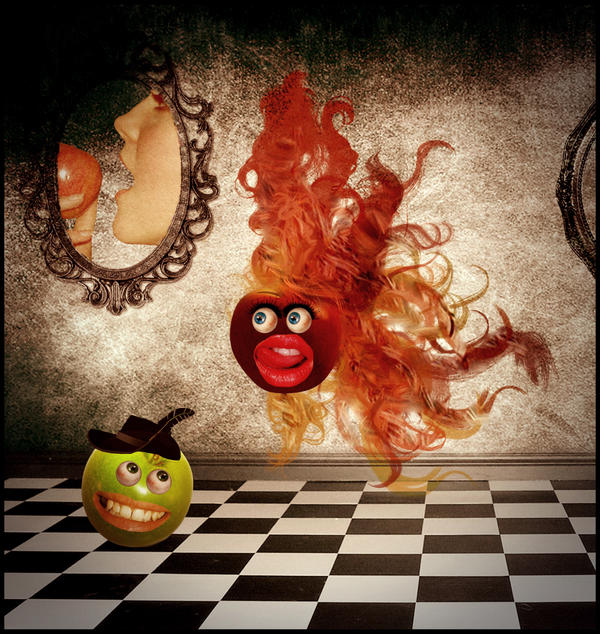
"The important thing is not to stop questioning. Curiosity has its own reason for existing. One cannot help but be in awe when he contemplates the mysteries of eternity, of life, of the marvelous structure of reality. It is enough if one tries merely to comprehend a little of this mystery every day. Never lose a holy curiosity." Albert Einstein


:typerhappy:


-----------------------------------------------
*this cannot be used without my written permission*


Apples: [link] & [link]
Background: [link]
Eyeballs: [link]
Mouths: [link] & [link]
Hat: [link]
Frame: [link]
Model: [link]
and the brushes I kind of forgotten where I got them so if you recognize them give me a link:)

Comments


love 0 0 joy 1 1 wow 0 0 mad 0 0 sad 0 0 fear 0 0 neutral 0 0
:iconcsnyder:
very fun image
and great depth
i love the vibrant color
:iconcolorsofdawn:
It took me like 4 to 5 hours to do this:giggle:(I just started making this kind of stuff and I am pretty slow-or so I think:laughing:)!
but are you sure about the color?because I have other versions with a bit less color and I wasn't sure which one to submit!

--
The world always looks brighter from behind a SMILE...it's a curve that sets everything straight !!!!!!!!!


:kitty: :butterflytwo: :kitty:

[link]
:iconcsnyder:
well you will get faster in time for sure and yes i think the color works well for this
adds to the festive mood
:iconcolorsofdawn:
Like the worlds "festive mood" ;P!
Ok,I'll keep this version then:D

--
The world always looks brighter from behind a SMILE...it's a curve that sets everything straight !!!!!!!!!


:kitty: :butterflytwo: :kitty:

[link]
:icondevoral:
Have you learned how to use layers yet? You should add some shadows to some parts. Like the hat on the apple. ;)
:iconcolorsofdawn:
Yes,of course I know how to use layers:giggle:!
you want me add a texture to this,in order to put some shadow in some parts! is it this what you are saying?
think you can help me find a texture like this?

--
The world always looks brighter from behind a SMILE...it's a curve that sets everything straight !!!!!!!!!


:kitty: :butterflytwo: :kitty:

[link]
:icondevoral:
Well what I usually do is use the image itself. In this case you would duplicate the hat layer so now you have two. Make the one thats underneath all black. I usually do that by turning the brightness all the way down. Then add a gaussian blur the the black layer. You have to try it to see how much guassian blur you want. Then you adjust the opacity of the blurred layer so its transparent. Then you cut away the parts of the layer that you dont want. Like the top. Not sure if that makes sense.
:iconcolorsofdawn:
Right name the image it's jpg,the original one in photoshop had like 20 layers (for the hat,eyes..apple and so on)!
so now,how do I duplicate when I don't have one or...I'll have to open the original version?

and when I finally got it right,I make the hat layer all black?and cut away parts of the layer by using the background eraser?

sorry for bothering you,but I'm pretty new to this:blushes:

--
The world always looks brighter from behind a SMILE...it's a curve that sets everything straight !!!!!!!!!


:kitty: :butterflytwo: :kitty:

[link]

Details

August 17, 2008
7.8 MB
111 KB
600×633

Statistics

27
15 [who?]
304 (0 today)
9 (0 today)

Share

Link
Embed
Thumb

Site Map